This document will describe how to create POS sale
transactions using the Flooid services layer. The consumer
of these services could be anything capable of calling web
services over http. This includes light mobile applications,
web pages, legacy applications, or even command line
scripts. The end user of the caller might be store
personnel, shoppers, call center associates, or some
automated integration layer.
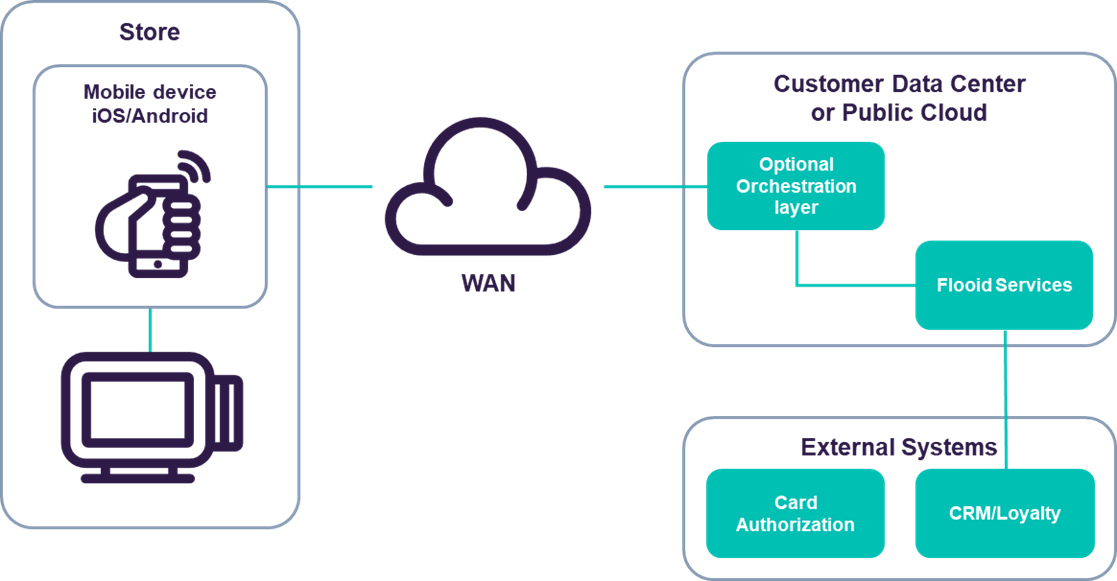
The following diagram show this process at a high level. The
Flooid services expose all the necessary business logic for
use by the mobile end-point.
Architectural Overview
In many cases, it might be useful to put an orchestration
layer between the end-point and the services. Some reasons
to consider an orchestration layer:
-
Cases where a retailer already has a mobile application;
the end-point application can remain unchanged with the
orchestration layer mapping to/from Flooid APIs.
-
Cases where the mobile application provides more than POS
functions. The mobile app can call a consistent back-end
and that can decide how/when to use Flooid services.
-
Consolidation of operations. The Flooid services are
fine-grained. It may be useful to have a higher level,
simplified API between the end-point and the server.
-
Message and/or protocol translation. The Flooid services
use XML as the message format, and HTTP as the protocol.
If a retailer desires to use some other format (JSON) or
protocol (Sockets), the orchestration layer can act
translate to/from the Flooid API.
This document will provide examples that can be used as the
framework for performing integrations. These examples were
created using the open source
Postman tool and can
be imported into Postman. Here is the export file
Flooid General Use.postman_collection.json
The following sections will show these examples and detail
data that can be (or must be) changed to run different
scenarios.
The URLs for each of these calls uses the IP address of the
load balancer in GCP that acts as the entry point
(10.218.32.69) in the environment used for testing these
calls. The actual IP or hostname used may need to change
based on the environment used for testing.
Overall Process Flow
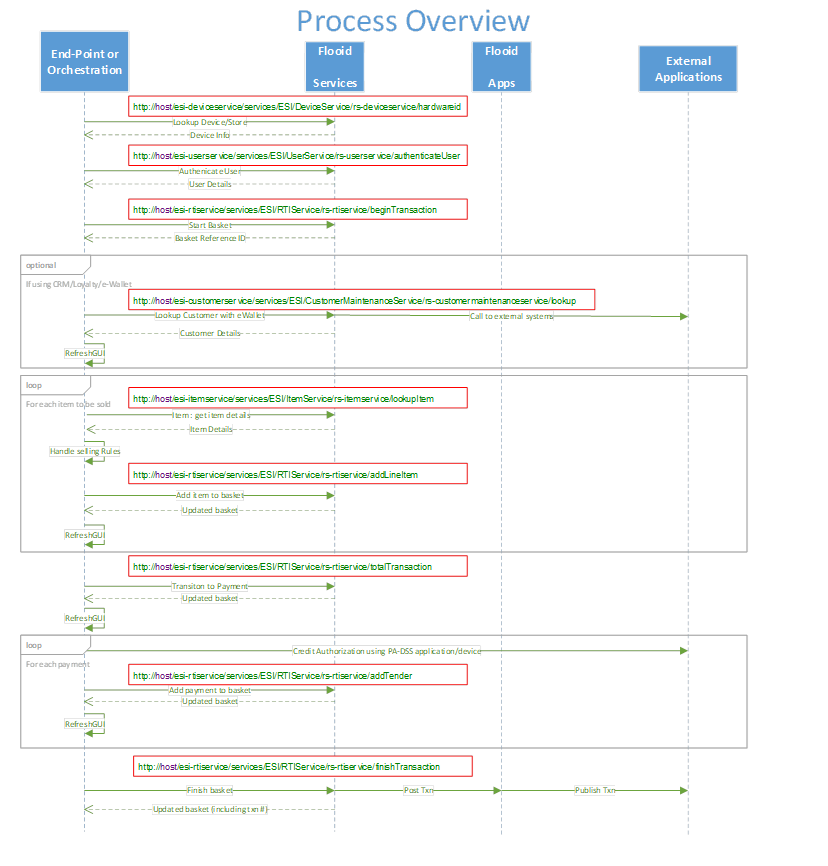
The diagram below shows the flow of the MPOS application
performing sales transactions using the Flooid services.
Some of these calls happen once, while others are repeated
as needed.
Setup Calls
Device Identification
URL:
http://10.218.32.69/esi-deviceservice/services/ESI/DeviceService/rs-deviceservice/hardwareid
Before the MPOS application can do anything useful, it needs
to verify that it’s a configured device for use in the
store. This call takes the “hostname” of the end-point as
input and will look up the data in the central database. If
it’s found the returning message will have details about the
device.
Here is an example request XML:
                <DeviceRequestGetHardwareId xmlns='http://www.pcmsgroup.com/DEVICEValidation/namespace/' xmlns:pcmsenv='http://www.pcmsgroup.com/envelope/namespace/'>
                    <Header>
                        <pcmsenv:MessageID>123</pcmsenv:MessageID>
                        <pcmsenv:Requestor>MPOS</pcmsenv:Requestor>
                        <pcmsenv:WorkstationID>us_epClient002</pcmsenv:WorkstationID>
                    </Header>
                    <hardwareId>us_epClient002</hardwareId>
                </DeviceRequestGetHardwareId>
And the sample result:
                <?xml version="1.0" encoding="UTF-8" standalone="yes"?>
                <ns2:DeviceResponseGetHardwareId xmlns="http://www.pcmsgroup.com/envelope/namespace/" xmlns:ns2="http://www.pcmsgroup.com/DEVICEValidation/namespace/" xmlns:ns3="http://www.pcmsgroup.com/DEVICE_PERSONALITYValidation/namespace/" xmlns:ns4="http://www.pcmsgroup.com/DEVICE_GROUPValidation/namespace/">
                    <ns2:Header>
                        <MessageID>123</MessageID>
                        <Response ResponseCode="OK"/>
                        <Requestor>MPOS</Requestor>
                        <WorkstationID>us_epClient002</WorkstationID>
                    </ns2:Header>
                    <ns2:Device docNo="0">
                        <ns2:NAME>US_EndPointClient002</ns2:NAME>
                        <ns2:CODE>82</ns2:CODE>
                        <ns2:HARDWARE_ID>us_epClient002</ns2:HARDWARE_ID>
                        <ns2:ORG_UNIT>4571</ns2:ORG_UNIT>
                        <ns2:DEVICE_TYPE>0</ns2:DEVICE_TYPE>
                        <ns2:USEABLE>true</ns2:USEABLE>
                        <ns2:IS_OPER_ACCOUNTABLE>0</ns2:IS_OPER_ACCOUNTABLE>
                        <ns2:CAN_AUTO_LOGON>false</ns2:CAN_AUTO_LOGON>
                        <ns2:AUTO_LOGON_USER>200</ns2:AUTO_LOGON_USER>
                        <ns2:PRINT_RECEIPT>true</ns2:PRINT_RECEIPT>
                        <ns2:DEVICE_PERSONALITIES>
                            <ns2:DEVICE_PERSONALITY>
                                <ns2:PERSONALITY_CODE>REMOTEDEV</ns2:PERSONALITY_CODE>
                                <ns2:ACTIVE>true</ns2:ACTIVE>
                            </ns2:DEVICE_PERSONALITY>
                            <ns2:DEVICE_PERSONALITY>
                                <ns2:PERSONALITY_CODE>MOBRETAIL</ns2:PERSONALITY_CODE>
                                <ns2:ACTIVE>false</ns2:ACTIVE>
                            </ns2:DEVICE_PERSONALITY>
                            <ns2:DEVICE_PERSONALITY>
                                <ns2:PERSONALITY_CODE>MOBHOSP</ns2:PERSONALITY_CODE>
                                <ns2:ACTIVE>false</ns2:ACTIVE>
                            </ns2:DEVICE_PERSONALITY>
                        </ns2:DEVICE_PERSONALITIES>
                        <ns2:KEY_GROUP_CODE>1</ns2:KEY_GROUP_CODE>
                        <ns2:KEY_SET_CODE>10</ns2:KEY_SET_CODE>
                        <ns2:DISTRIBUTE_TO>true</ns2:DISTRIBUTE_TO>
                        <ns2:MENU_OPTIONS_DISABLED xmlns:xsi="http://www.w3.org/2001/XMLSchema-instance" xsi:nil="true"/>
                    </ns2:Device>
                </ns2:DeviceResponseGetHardwareId>
The two highlighted entries in the response are particularly
useful. First is the device’s “Code” this value (82
in this case) is used in many of the subsequent calls to
identify which end-point is being used. The “ORG_UNIT”
(4571) is the store code. It is also used in the
calls that build up the basket and perform other processes.
These two data points provide the context for transaction
management for the whole sales process.
User Login
URL:
http://10.218.32.69/esi-userservice/services/ESI/UserService/rs-userservice/authenticateUser/
TBD – This service is not deployed in the test GCP
environment at this time.
Building a Basket
As shown in the previous section, sale transactions have a
defined lifecycle. The examples in the JSON file are set to
follow the correct steps as documented below.
There are some important data elements present in each call:
-
Date/time – used to tag the transaction and to
ensure all rules (promotions, taxes, etc.) are applied
when effective.
-
Store Code – used to determine specific details
about the context used.
-
Company Code – used in conjunction with the store
code.
-
Workstation ID – like a normal register number,
this allows for segmenting of transaction details. This is
the “short description” in the Flooid database.
-
Requestor – this is the in-process GUUID of the
transaction. It’s assigned when the transaction starts,
and subsequent calls must include it to be able to operate
on the transaction.
The majority of the calls described below return an ARTS
POSLog transaction. This will contain all the information
about the transaction as it exists after processing the
request. This includes item details, promotional discounts,
taxes, and transaction level totals. One example of a
complete transaction will be detailed at the end of this
section, although specific elements might be called out as
needed in each sub-section.
Starting a Transaction
URL:
http://10.218.32.69/esi-rtiservice/services/ESI/RTIService/rs-rtiservice/beginTransaction/
This XML can be used as-is, just make sure the date is
what’s required.
            <?xml version='1.0' encoding='UTF-8' standalone='yes'?>
            <RTSTransactionBegin MajorVersion='6' xmlns='http://www.nrf-arts.org/IXRetail/namespace/'>
                <ARTSHeader>
                    <MessageID>123</MessageID>
                    <DateTime>2020-06-26T09:00:50.239+01:00</DateTime>
                    <BusinessUnit TypeCode='RetailStore'>4571</BusinessUnit>
                    <BusinessUnit TypeCode='AdministrationCenter'>A001</BusinessUnit>
                    <WorkstationID>82</WorkstationID>
                </ARTSHeader>
            </RTSTransactionBegin>
The return XML will contain the Requestor data that
will be needed for the remainder of the calls to build and
complete the transaction.
<Requestor>5f0870efee9707780ad34d59</Requestor>
Product Lookup
URL:
http://10.218.32.69/esi-itemservice/services/ESI/ItemService/rs-itemservice/lookupItem/
Before selling items, it’s useful to look them up. The
return details will provide the caller with details about
the items, including any selling rules/restrictions. The
appropriate pricing will also be included.
The key elements in the request are:
-
Date/time – used to tag the transaction and to
ensure all rules (promotions, taxes, etc.) are applied
when effective.
-
Store Code – used to determine specific details
about the context used.
-
Item ID – used to fetch the product data. This can
be either a SKU code or UPC.
The request XML (using the SKU code) looks like this:
            <ItemLookup xmlns="http://www.nrf-arts.org/IXRetail/namespace/">
                <ARTSHeader ActionCode="Lookup" MessageType="Request">
                    <MessageID>2356</MessageID>
                    <DateTime TypeCode="Message">2020-06-09T18:13:51.0Z</DateTime>
                </ARTSHeader>
                <ItemMaintenance>
                    <BusinessUnit TypeCode="RetailStore">4571</BusinessUnit>
                    <Item>
                        <ItemID Type="SKU">70819</ItemID>
                    </Item>
                </ItemMaintenance>
            </ItemLookup>
To lookup by UPC, the ItemID line would change to:
<ItemID Type="UPC">030000010204</ItemID>
The return values from the call can be used to control the
flow of the caller.
Adding an Item
URL:
http://10.218.32.69/esi-rtiservice/services/ESI/RTIService/rs-rtiservice/addLineItem/
Adding an item includes passing in the Item ID as discussed
in the item lookup section. The Requestor number allows the
system to retrieve the in-process sale for processing. The
XML definition allows for sending in the selling price as
well as the item identifier, in case the caller wants to
override the system pricing. Note that it is not required to
lookup the item prior to adding it to the transaction; it
may be a best practice to handle not-on-file items or any
restrictions on the end-point.
            <?xml version='1.0' encoding='UTF-8' standalone='yes'?>
            <RTSLineItemAdd MajorVersion='6' xmlns='http://www.nrf-arts.org/IXRetail/namespace/'>
                <ARTSHeader>
                    <MessageID>123</MessageID>
                    <Requestor>5f0870efee9707780ad34d59</Requestor>
                    <BusinessUnit TypeCode='RetailStore'>4571</BusinessUnit>
                    <BusinessUnit TypeCode='AdministrationCenter'>A001</BusinessUnit>
                    <WorkstationID>85</WorkstationID>
                </ARTSHeader>
                <LineItemAddPOSLog>
                    <Transaction>
                        <BusinessUnit>
                            <UnitID TypeCode='RetailStore'>4571</UnitID>
                        </BusinessUnit>
                        <WorkstationID>85</WorkstationID>
                        <SequenceNumber>0</SequenceNumber>
                        <BusinessDayDate>2020-06-16Z</BusinessDayDate>
                        <RetailTransaction Version='2.2'>
                            <LineItem>
                                <SequenceNumber>1</SequenceNumber>
                                <Sale ItemSubType='Normal'>
                                    <POSIdentity POSIDType='SKU'>
                                        <POSItemID>70824</POSItemID>
                                    </POSIdentity>
                                    <ActualSalesUnitPrice>1.99</ActualSalesUnitPrice>
                                    <Quantity UnitOfMeasureCode='EA'>1</Quantity>
                                </Sale>
                            </LineItem>
                        </RetailTransaction>
                        <pcms:PCMSTransaction xmlns:pcms='http://www.pcmsgroup.com/XML'>
                            <pcms:ExternalSystem ProcessingType='123'>
                                <pcms:System>MPOS</pcms:System>
                            </pcms:ExternalSystem>
                        </pcms:PCMSTransaction>
                    </Transaction>
                </LineItemAddPOSLog>
            </RTSLineItemAdd>
This call can be repeated as needed to add all the items to
be sold.
Completing the Transaction
There are two primary ways to complete the transaction:
Suspend and Finish. There are folders in the examples to
show how each one works.
Suspend
URL:
http://10.218.32.69/esi-rtiservice/services/ESI/RTIService/rs-rtiservice/suspendTransaction
The XML to suspend a transaction is simple and can be used
whenever there are no tenders present.
            <?xml version='1.0' encoding='UTF-8' standalone='yes'?>
            <RTSTransactionSuspend xmlns:ns2='http://www.pcmsgroup.com/XML'  MajorVersion='6' xmlns='http://www.nrf-arts.org/IXRetail/namespace/'>
                <ARTSHeader>
                    <MessageID>456</MessageID>
                    <Requestor>5f0870efee9707780ad34d59</Requestor>
                    <BusinessUnit> TypeCode='RetailStore'>4571</BusinessUnit>
                    <BusinessUnit> TypeCode='AdministrationCenter'>A001</BusinessUnit>
                    <WorkstationID>82</WorkstationID>
                </ARTSHeader>
            </RTSTransactionSuspend>
The result will be the whole transaction, in case the caller
needs to print/send a receipt. After the suspend, the
transaction is available to be recalled on a mainline POS as
long as the store code is the same. The transaction contents
returned will contain the receipt barcode data that can be
printed or included in a message to the customer. When this
barcode is scanned on a manned POS, the transaction will be
recalled and can be completed:
            <ns2:PCMSReceiptEntry>
                <ns2:ReceiptBarcode>9990245710820000083</ns2:ReceiptBarcode>
            </ns2:PCMSReceiptEntry>
Finish
To completely finish a transaction, there are three steps
that mimic what happens on the mainline POS. First, the
system needs to so a final “total” of the transaction and
apply any total-time promotions. Then payments are added
until the balance gets to 0. Finally, the transaction can be
posted to the server.
Enter Tender Mode
URL:
http://10.218.32.69/esi-rtiservice/services/ESI/RTIService/rs-rtiservice/totalTransaction
This is a simple command to get the right business logic to
fire and get the state of the transaction ready to accept
payment.
            <RTSTransactionTotal Version='2.2' xmlns:ns2='http://www.pcmsgroup.com/XML'  MajorVersion='6' xmlns='http://www.nrf-arts.org/IXRetail/namespace/'>
                <ARTSHeader>
                    <MessageID>456</MessageID>
                    <Requestor>5f0870efee9707780ad34d59</Requestor>
                    <BusinessUnit TypeCode='RetailStore'>4571</BusinessUnit>
                    <BusinessUnit TypeCode='AdministrationCenter'>A001</BusinessUnit>
                    <WorkstationID>82</WorkstationID>
                </ARTSHeader>
            </RTSTransactionTotal>
The caller should get the balance due from the XML returned
from this call to determine how much payment is needed to
complete the sale.
Apply Payment(s)
URL:
http://10.218.32.69/esi-rtiservice/services/ESI/RTIService/rs-rtiservice/addTender
Any number of payments can be applied to get the transaction
balance paid. The caller is responsible for knowing how much
to collect, as well as for any authorisations that need to
happen. The ESI service is there to record the tender as
part of the transaction.
The example given is for a credit card. The Postman examples
also include a cash payment example. Split tenders simply
involve multiple calls to the
addTender
service.
            <RTSTenderAdd MajorVersion='6' xmlns='http://www.nrf-arts.org/IXRetail/namespace/'>
                <ARTSHeader>
                    <MessageID>123</MessageID>
                    <Requestor>5f0870efee9707780ad34d59</Requestor>
                    <BusinessUnit> TypeCode='RetailStore'>4571</BusinessUnit>
                    <BusinessUnit> TypeCode='AdministrationCenter'>A001</BusinessUnit>
                    <WorkstationID>82</WorkstationID>
                </ARTSHeader>
                <TenderAddPOSLog>
                    <Transaction>
                        <BusinessUnit>
                            <UnitID> TypeCode='RetailStore'>4571</UnitID>
                        </BusinessUnit>
                        <WorkstationID>82</WorkstationID>
                        <SequenceNumber>0</SequenceNumber>
                        <BusinessDayDate>2020-06-16Z</BusinessDayDate>
                        <OperatorID>999</OperatorID>
                        <RetailTransaction Version='2.2'>
                            <LineItem>
                                <SequenceNumber>1</SequenceNumber>
                                <Tender TenderType='CreditDebit' TypeCode='Sale'>
                                    <TenderID>1</TenderID>
                                    <Amount>3.19</Amount>
                                    <Authorization HostAuthorized='true' VerifiedByPINFlag='false' SignatureRequiredFlag='true' ns2:AuthorizedOnline='false' xmlns:ns2='http://www.pcmsgroup.com/XML'>
                                        <AuthorizationCode>123467</AuthorizationCode>
                                        <MerchantNumber>508330</MerchantNumber>
                                        <AuthorizingTermID>04380001</AuthorizingTermID>
                                        <Reversal/>
                                        <EMVDebug>
                                            <ns2:PCMSEMVDebug>
                                                <ns2:ApplicationPANSequenceNumber>3</ns2:ApplicationPANSequenceNumber>
                                                <ns2:ExpiryDate>010125</ns2:ExpiryDate>
                                                <ns2:StartDate>010125</ns2:StartDate>
                                            </ns2:PCMSEMVDebug>
                                        </EMVDebug>
                                        <ns2:PCMSAuthorization>
                                            <ns2:OLAMethod>0</ns2:OLAMethod>
                                            <ns2:RetrievalReferenceNumber>002571811454405717095</ns2:RetrievalReferenceNumber>
                                        </ns2:PCMSAuthorization>
                                    </Authorization>
                                    <CreditDebit CardType='Credit' TypeCode='Visa'>
                                        <PrimaryAccountNumber>***************3968</PrimaryAccountNumber>
                                        <IssueSequence>3</IssueSequence>
                                        <Track2Data/>
                                    </CreditDebit>
                                    <ns2:PCMSTender xmlns:ns2='http://www.pcmsgroup.com/XML'>
                                        <ns2:CardProductName>Mastercard</ns2:CardProductName>
                                        <ns2:MediaType>4</ns2:MediaType>
                                        <ns2:TenderName>MasterCard</ns2:TenderName>
                                        <ns2:PaymentDevice>Mobile Device</ns2:PaymentDevice>
                                    </ns2:PCMSTender>
                                </Tender>
                                <ns2:PCMSTender xmlns:ns2='http://www.pcmsgroup.com/XML'>
                                    <ns2:PaymentUUID>002571811479689837476</ns2:PaymentUUID>
                                </ns2:PCMSTender>
                            </LineItem>
                        </RetailTransaction>
                        <pcms:PCMSTransaction xmlns:pcms='http://www.pcmsgroup.com/XML'>
                            <pcms:ExternalSystem ProcessingType='123'>
                                <pcms:System>MPOS</pcms:System>
                            </pcms:ExternalSystem>
                        </pcms:PCMSTransaction>
                    </Transaction>
                </TenderAddPOSLog>
            </RTSTenderAdd>
Finish/Post Transaction
URL:
http://10.218.32.69/esi-rtiservice/services/ESI/RTIService/rs-rtiservice/finishTransaction
Like suspend, the XML for posting the transaction is
relatively simple.
            <?xml version='1.0' encoding='UTF-8' standalone='yes'?>
            <RTSTransactionFinished MajorVersion='6' xmlns='http://www.nrf-arts.org/IXRetail/namespace/'>
                <ARTSHeader>
                    <MessageID>456</MessageID>
                    <Requestor>5f0870efee9707780ad34d59</Requestor>
                    <DateTime>2020-06-16T14:07:50.239+01:00</DateTime>
                    <BusinessUnit TypeCode='RetailStore'>4571</BusinessUnit>
                    <BusinessUnit TypeCode='AdministrationCenter'>A001</BusinessUnit>
                    <WorkstationID>82</WorkstationID>
                </ARTSHeader>
            </RTSTransactionFinished>
POSLog Example
As mentioned previously, the return value for most of the
calls above will be a view of the current transaction. The
example shown here is the final view of the transaction,
with payment applied and a transaction number assigned.
<?xml version="1.0" encoding="UTF-8" standalone="yes"?>
<RTSTransactionFinishedResponse xmlns="http://www.nrf-arts.org/IXRetail/namespace/" xmlns:ns2="http://www.pcmsgroup.com/XML" MajorVersion="6">
<ARTSHeader>
<MessageID>456</MessageID>
<Response ResponseCode="OK">
<RequestID>456</RequestID>
</Response>
<Requestor>5f0870efee9707780ad34d59</Requestor>
<BusinessUnit> TypeCode="RetailStore">4571</BusinessUnit>
<BusinessUnit> TypeCode="AdministrationCenter">A001</BusinessUnit>
<WorkstationID>82</WorkstationID>
</ARTSHeader>
<POSLog>
<Transaction>
<BusinessUnit>
<UnitID> TypeCode="RetailStore">4571</UnitID>
</BusinessUnit>
<BusinessUnit>
<UnitID> TypeCode="AdministrationCenter">A001</UnitID>
</BusinessUnit>
<WorkstationID>82</WorkstationID>
<SequenceNumber>9</SequenceNumber>
<BusinessDayDate>2020-07-10Z</BusinessDayDate>
<BeginDateTime>2020-07-10T13:45:19Z</BeginDateTime>
<EndDateTime>2020-07-10T13:49:26.345Z</EndDateTime>
<OperatorID>999</OperatorID>
<CurrencyCode>USD</CurrencyCode>
<ReceiptNumber>9</ReceiptNumber>
<RetailTransaction Version="2.2" TransactionStatus="Finished">
<LineItem EntryMethod="Scanned" ns2:LineType="1">
<SequenceNumber>1</SequenceNumber>
<BeginDateTime>2020-07-10T13:46:03Z</BeginDateTime>
<ns2:PCMSLineItem>
<ns2:DetailNumber> TxnType="TxnDetail">1</ns2:DetailNumber>
<ns2:ProductCodeID>5354</ns2:ProductCodeID>
</ns2:PCMSLineItem>
<Sale ItemSubType="pcms:NotNormallyStocked" ns2:AllowPriceOverride="true" ns2:AllowLineDiscounts="true" ns2:AllowTransactionDiscounts="true">
<ItemID> Type="SKU">70824</ItemID>
<MerchandiseHierarchy> Level="5">1014</MerchandiseHierarchy>
<MerchandiseHierarchy> Level="4">0201</MerchandiseHierarchy>
<MerchandiseHierarchy> Level="3">0100</MerchandiseHierarchy>
<MerchandiseHierarchy> Level="2">010101</MerchandiseHierarchy>
<MerchandiseHierarchy Level="1"/>
<Description>Special K Red Berry Cereal</Description>
<TaxIncludedInPriceFlag>true</TaxIncludedInPriceFlag>
<RegularSalesUnitPrice>2.19</RegularSalesUnitPrice>
<ActualSalesUnitPrice>2.19</ActualSalesUnitPrice>
<ExtendedAmount>2.19</ExtendedAmount>
<Quantity> UnitOfMeasureCode="each">1</Quantity>
<RetailPriceModifier MethodCode="Promotion">
<SequenceNumber>1</SequenceNumber>
<Amount> Action="Subtract">0</Amount>
<PreviousPrice>2.19</PreviousPrice>
<PromotionID>GM309</PromotionID>
<PriceDerivationRule ApplicationType="PromotionalAward">
<PriceDerivationRuleID></PriceDerivationRuleID>
<Amount> Action="pcms:Apportion">0</Amount>
</PriceDerivationRule>
<ns2:PCMSRetailPriceModifier>
<ns2:DiscountCode>50</ns2:DiscountCode>
<ns2:DiscountCodeId>18</ns2:DiscountCodeId>
<ns2:DiscountText>Buy SpecK Get Milk 1.00</ns2:DiscountText>
<ns2:DiscountTypeId>8</ns2:DiscountTypeId>
<ns2:Included>2</ns2:Included>
<ns2:PreviousPrice>2.19</ns2:PreviousPrice>
</ns2:PCMSRetailPriceModifier>
</RetailPriceModifier>
<Tax TaxType="Sales" TaxAtSource="TaxedAtOrigin">
<SequenceNumber>0</SequenceNumber>
<TaxAuthority>US-OH</TaxAuthority>
<TaxableAmount>2.19</TaxableAmount>
<Amount>0.13</Amount>
<Percent>6.500000</Percent>
<TaxRuleID>OH</TaxRuleID>
<TaxGroupID>T</TaxGroupID>
<ns2:PCMSTax>
<ns2:TaxRuleDesc>Standard Rate</ns2:TaxRuleDesc>
<ns2:TaxRuleName>US_SALESTAX</ns2:TaxRuleName>
</ns2:PCMSTax>
</Tax>
<ns2:PCMSSale>
<ns2:CanQtySale>true</ns2:CanQtySale>
<ns2:CustomerLoyaltyCategory>CLC-A</ns2:CustomerLoyaltyCategory>
<ns2:Display>
<ns2:Name>Special K Red Berry Cereal</ns2:Name>
<ns2:ReceiptText>Special K Red Berry Cereal</ns2:ReceiptText>
</ns2:Display>
<ns2:ExtendedAmountAllDiscounts>2.19</ns2:ExtendedAmountAllDiscounts>
<ns2:ItemReduced>false</ns2:ItemReduced>
<ns2:ItemStatus>11</ns2:ItemStatus>
<ns2:LinkedItemLevel>0</ns2:LinkedItemLevel>
<ns2:LoyaltyProduct>true</ns2:LoyaltyProduct>
<ns2:PriceCodeRegularSales>3</ns2:PriceCodeRegularSales>
<ns2:PriceControl>1</ns2:PriceControl>
<ns2:PriceDiscountable>2.19</ns2:PriceDiscountable>
<ns2:ProductHandling>10</ns2:ProductHandling>
<ns2:PromotionableFlag>true</ns2:PromotionableFlag>
<ns2:Refundable>true</ns2:Refundable>
<ns2:SkuOwner>A001</ns2:SkuOwner>
<ns2:SkuOwnerType>1</ns2:SkuOwnerType>
<ns2:StaffDiscountCategory>A</ns2:StaffDiscountCategory>
<ns2:StaffDiscountable>true</ns2:StaffDiscountable>
</ns2:PCMSSale>
</Sale>
</LineItem>
<LineItem EntryMethod="Scanned" ns2:LineType="1">
<SequenceNumber>2</SequenceNumber>
<BeginDateTime>2020-07-10T13:47:17Z</BeginDateTime>
<ns2:PCMSLineItem>
<ns2:DetailNumber> TxnType="TxnDetail">2</ns2:DetailNumber>
<ns2:ProductCodeID>5358</ns2:ProductCodeID>
</ns2:PCMSLineItem>
<Sale ItemSubType="pcms:NotNormallyStocked" ns2:AllowPriceOverride="true" ns2:AllowLineDiscounts="true" ns2:AllowTransactionDiscounts="true">
<ItemID> Type="SKU">70828</ItemID>
<MerchandiseHierarchy> Level="5">1037</MerchandiseHierarchy>
<MerchandiseHierarchy> Level="4">0203</MerchandiseHierarchy>
<MerchandiseHierarchy> Level="3">0100</MerchandiseHierarchy>
<MerchandiseHierarchy> Level="2">010101</MerchandiseHierarchy>
<MerchandiseHierarchy Level="1"/>
<Description>Whole Milk</Description>
<TaxIncludedInPriceFlag>true</TaxIncludedInPriceFlag>
<RegularSalesUnitPrice>1.29</RegularSalesUnitPrice>
<ActualSalesUnitPrice>1.29</ActualSalesUnitPrice>
<ExtendedAmount>1.29</ExtendedAmount>
<Quantity> UnitOfMeasureCode="each">1</Quantity>
<RetailPriceModifier MethodCode="Promotion">
<SequenceNumber>1</SequenceNumber>
<Amount> Action="Subtract">0.290000</Amount>
<PreviousPrice>1.29</PreviousPrice>
<PromotionID>GM309</PromotionID>
<PriceDerivationRule ApplicationType="PromotionalAward">
<PriceDerivationRuleID></PriceDerivationRuleID>
<Amount> Action="pcms:Apportion">0.290000</Amount>
</PriceDerivationRule>
<ns2:PCMSRetailPriceModifier>
<ns2:DiscountCode>50</ns2:DiscountCode>
<ns2:DiscountCodeId>18</ns2:DiscountCodeId>
<ns2:DiscountText>Buy SpecK Get Milk 1.00</ns2:DiscountText>
<ns2:DiscountTypeId>8</ns2:DiscountTypeId>
<ns2:Included>2</ns2:Included>
<ns2:PreviousPrice>1.29</ns2:PreviousPrice>
</ns2:PCMSRetailPriceModifier>
</RetailPriceModifier>
<Tax TaxType="Sales" TaxAtSource="TaxedAtOrigin">
<SequenceNumber>0</SequenceNumber>
<TaxAuthority>US-OH</TaxAuthority>
<TaxableAmount>1.00</TaxableAmount>
<Amount>0.06</Amount>
<Percent>6.500000</Percent>
<TaxRuleID>OH</TaxRuleID>
<TaxGroupID>T</TaxGroupID>
<ns2:PCMSTax>
<ns2:TaxRuleDesc>Standard Rate</ns2:TaxRuleDesc>
<ns2:TaxRuleName>US_SALESTAX</ns2:TaxRuleName>
</ns2:PCMSTax>
</Tax>
<ns2:PCMSSale>
<ns2:CanQtySale>true</ns2:CanQtySale>
<ns2:CustomerLoyaltyCategory>CLC-A</ns2:CustomerLoyaltyCategory>
<ns2:Display>
<ns2:Name>Whole Milk</ns2:Name>
<ns2:ReceiptText>Whole Milk</ns2:ReceiptText>
</ns2:Display>
<ns2:ExtendedAmountAllDiscounts>1.000000</ns2:ExtendedAmountAllDiscounts>
<ns2:ItemReduced>false</ns2:ItemReduced>
<ns2:ItemStatus>11</ns2:ItemStatus>
<ns2:LinkedItemLevel>0</ns2:LinkedItemLevel>
<ns2:LoyaltyProduct>true</ns2:LoyaltyProduct>
<ns2:PriceCodeRegularSales>3</ns2:PriceCodeRegularSales>
<ns2:PriceControl>1</ns2:PriceControl>
<ns2:PriceDiscountable>1.29</ns2:PriceDiscountable>
<ns2:ProductHandling>10</ns2:ProductHandling>
<ns2:PromotionableFlag>true</ns2:PromotionableFlag>
<ns2:Refundable>true</ns2:Refundable>
<ns2:SkuOwner>A001</ns2:SkuOwner>
<ns2:SkuOwnerType>1</ns2:SkuOwnerType>
<ns2:StaffDiscountCategory>A</ns2:StaffDiscountCategory>
<ns2:StaffDiscountable>true</ns2:StaffDiscountable>
</ns2:PCMSSale>
</Sale>
</LineItem>
<LineItem>
<SequenceNumber>3</SequenceNumber>
<Discount ProratedFlag="true">
<Amount>0.29</Amount>
<PriceDerivationRule ApplicationType="PromotionalAward">
<PriceDerivationRuleID>GM309</PriceDerivationRuleID>
<ReasonCode>8:GM309</ReasonCode>
</PriceDerivationRule>
<ns2:PCMSDiscount>
<ns2:ActivationCount>1</ns2:ActivationCount>
<ns2:AmountDiscountable>3.48</ns2:AmountDiscountable>
<ns2:DiscountCode>52</ns2:DiscountCode>
<ns2:DiscountCodeId>20</ns2:DiscountCodeId>
<ns2:DiscountText>Buy SpecK Get Milk 1.00</ns2:DiscountText>
<ns2:DiscountTypeId>8</ns2:DiscountTypeId>
<ns2:TriggerDetailNumber>1</ns2:TriggerDetailNumber>
</ns2:PCMSDiscount>
</Discount>
</LineItem>
<LineItem>
<SequenceNumber>4</SequenceNumber>
<BeginDateTime>2020-07-10T13:47:55Z</BeginDateTime>
<Tax TaxType="Sales" TaxAtSource="TaxedAtOrigin">
<TaxAuthority>US-OH</TaxAuthority>
<TaxableAmount>3.19</TaxableAmount>
<Amount>0.19</Amount>
<Percent>6.500000</Percent>
<TaxRuleID>OH</TaxRuleID>
<TaxGroupID>T</TaxGroupID>
<ns2:PCMSTax>
<ns2:TaxRuleDesc>Standard Rate</ns2:TaxRuleDesc>
<ns2:TaxRuleName>US_SALESTAX</ns2:TaxRuleName>
</ns2:PCMSTax>
</Tax>
</LineItem>
<LineItem Action="Add">
<SequenceNumber>5</SequenceNumber>
<Tender TenderType="CreditDebit" TypeCode="Sale">
<TenderID>1</TenderID>
<Amount>3.19</Amount>
<TenderChange>
<TenderID>1</TenderID>
<Amount>0.000000</Amount>
<ns2:PCMSTender>
<ns2:MediaType>1</ns2:MediaType>
</ns2:PCMSTender>
</TenderChange>
<Authorization HostAuthorized="true" VerifiedByPINFlag="false" SignatureRequiredFlag="true" ns2:AuthorizedOnline="false">
<AuthorizationCode>123467</AuthorizationCode>
<MerchantNumber>508330</MerchantNumber>
<AuthorizingTermID>04380001</AuthorizingTermID>
<Reversal/>
<EMVDebug>
<ns2:PCMSEMVDebug>
<ns2:ApplicationPANSequenceNumber>3</ns2:ApplicationPANSequenceNumber>
<ns2:ExpiryDate>010125</ns2:ExpiryDate>
<ns2:StartDate>010125</ns2:StartDate>
</ns2:PCMSEMVDebug>
</EMVDebug>
<ns2:PCMSAuthorization>
<ns2:OLAMethod>0</ns2:OLAMethod>
<ns2:RetrievalReferenceNumber>002571811454405717095</ns2:RetrievalReferenceNumber>
</ns2:PCMSAuthorization>
</Authorization>
<CreditDebit CardType="Credit" TypeCode="Visa">
<PrimaryAccountNumber>***************3968</PrimaryAccountNumber>
<IssueSequence>3</IssueSequence>
<Track2Data></Track2Data>
</CreditDebit>
<ns2:PCMSTender>
<ns2:CardProductName>Mastercard</ns2:CardProductName>
<ns2:MediaType>4</ns2:MediaType>
<ns2:PaymentDevice>Mobile Device</ns2:PaymentDevice>
<ns2:TenderName>MasterCard</ns2:TenderName>
</ns2:PCMSTender>
</Tender>
<ns2:PCMSTender>
<ns2:PaymentUUID>002571811479689837476</ns2:PaymentUUID>
</ns2:PCMSTender>
</LineItem>
<Total> TotalType="TransactionGrandAmount">3.190000</Total>
<Total> TotalType="TransactionGrossAmount">3.48</Total>
<Total> TotalType="TransactionNetAmount">3.000000</Total>
<Total> TotalType="TransactionTaxAmount">0.19</Total>
<Total> TotalType="TransactionBalanceDueAmount">0.000000</Total>
<ns2:PCMSEvent>
<ns2:PCMSReceiptEntry>
<ns2:ReceiptBarcode>9990245710820000090</ns2:ReceiptBarcode>
</ns2:PCMSReceiptEntry>
</ns2:PCMSEvent>
</RetailTransaction>
<ns2:PCMSTransaction>
<ns2:WorkstationPersonality>REMOTEDEV</ns2:WorkstationPersonality>
<ns2:ExternalSystem ProcessingType="123">
<ns2:System>MPOS</ns2:System>
</ns2:ExternalSystem>
<ns2:LastUpdatedDate>2020-07-10T13:49:26.394Z</ns2:LastUpdatedDate>
</ns2:PCMSTransaction>
</Transaction>
</POSLog>
</RTSTransactionFinishedResponse>
Reference Material
RTS/RTI XSD
There are many files that make up the ARTS RTS schema. This
is used in the basket calculation and other RTI service
calls.
RTI-Schema.zip
Item Lookup XSD
PCMSItemLookup.xsd
POSLog XSD
PCMSPOSSimpleTypes.xsd
and
PCMSPOSLogExtensions.xsd